
Sprocket Sports
Sprocket SportsSports
3.443.00 Reviews
- Version
- 6.0.22
- Installs
- 50.00K
- Age Rating
- Everyone
Screenshots
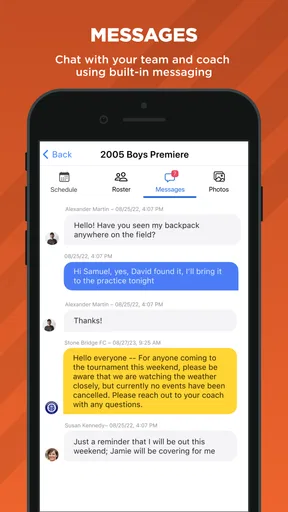
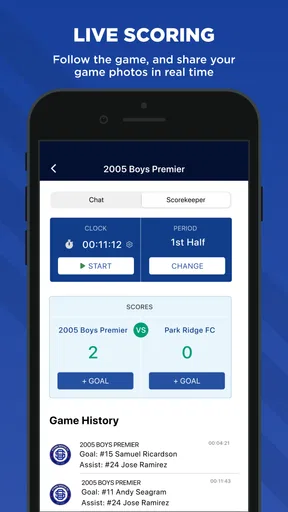
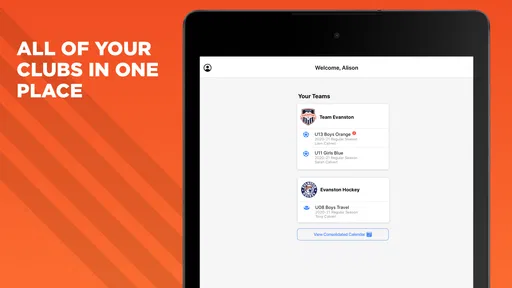
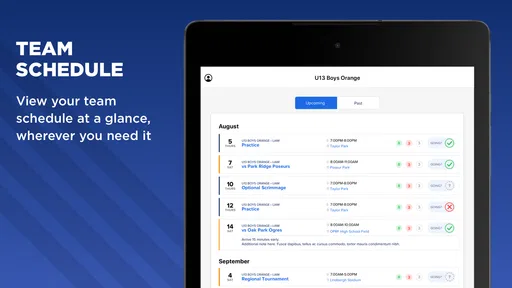
Our Review of Sprocket Sports
 Analysis by Appyee
I approached Sprocket Sports as a practical tool for the less glamorous side of sports: getting people enrolled, keeping team information organized, and helping a club avoid the usual trail of scattered messages and spreadsheets. It is a free sports app from Sprocket Sports, aimed at everyone rather than a narrow age group, and its central promise is administration rather than entertainment. That distinction matters. If you are looking for scores, live match coverage, training videos, or a fantasy competition, this is not the kind of sports app I would choose. If you help run a youth team, club, league, or sports program, its value is more functional: it gives the organization a shared place to handle participation and team-related tasks.
My overall impression is useful but dependent on good setup. The app can make routine coordination easier, yet it cannot repair incomplete information, an invitation sent to the wrong person, or a club process that has never been clearly defined. In practice, many frustrations that look like app failures begin before the app is opened. A parent may be using the wrong email address, a player may belong to an old team record, or an administrator may expect a feature to appear before the account has been connected to the correct organization. I would treat Sprocket Sports as a system that rewards careful organization, not as a magic shortcut.
Where the real friction starts
The first obstacle is understanding who is supposed to do what. Enrollment and team management usually involve several people with different responsibilities: a club administrator creates or maintains the structure, a coach works with a roster, and a parent or player supplies personal details or responds to requests. When those roles are mixed together, even a straightforward screen can feel confusing. Before blaming the app, I would ask whether the account is being used by the right person and whether that person has actually been connected to the relevant team or program.
This is especially important in households with more than one child. Using one family member’s account while trying to manage another player can produce a result that feels like missing information, when the real issue is identity. I recommend deciding at the start which adult will handle enrollment, which email address will receive communication, and whether each player should be represented separately. Keeping that arrangement consistent prevents duplicate records and reduces the chance of completing a form under the wrong profile.
Another common sticking point is the difference between joining a sports organization and simply installing an app. Installation alone does not necessarily place a person on a roster. The organization still has to recognize the participant through its own enrollment or team-management process. That means a new user should not assume that opening the app will automatically reveal every team. If the expected program is absent, the sensible first check is the invitation, account identity, and organization connection rather than repeatedly reinstalling.
I also noticed how easily a user can misread a quiet screen. A blank team area may mean that setup is incomplete, that the wrong account is open, or that the administrator has not finished assigning the participant. It does not automatically mean the phone is broken. This is one of the most useful mental adjustments with Sprocket Sports: treat visible content as a reflection of the organization’s records, not only as a reflection of the application itself.
What to check before asking for help
My preferred setup routine is deliberately boring. I first confirm the spelling of the account details, then check that the invitation or enrollment message was intended for that exact account. I next close and reopen the app after completing a change, because a screen that was already open may not immediately show updated information. Finally, I check whether I am looking at the correct player, team, or program context. These steps take less time than creating a second account and later trying to merge the results.
It is also worth checking the basics of the device. Sprocket Sports supports devices running Android 8.0 or later, so an older Android installation should be checked before troubleshooting more complicated issues. I would also make sure the operating system and the app are not waiting for routine updates, and I would test the connection by opening another service. A weak or interrupted connection can make a roster, enrollment screen, or confirmation step appear incomplete even when the underlying record is fine.
When a page does not load correctly, I would use a simple sequence: leave the screen, reopen it, switch between a reliable Wi-Fi connection and mobile data if available, and restart the app. If the problem remains, restarting the device is a reasonable next step. I would avoid deleting the app immediately, particularly if I was halfway through enrollment or did not know whether the information had already been submitted. Reinstallation is not a substitute for knowing the account details needed to sign back in.
Notifications deserve a separate check because they can affect the workflow without making the app itself look faulty. If a user is waiting for an invitation or update, I would inspect the email address used during registration, look in filtered or junk folders, and confirm that the sender details were entered correctly. I would not create several accounts simply because one message is delayed. Multiple accounts can make it harder for an administrator to identify the correct participant and can create confusion later.
A useful habit for club staff is to keep a small internal record of which account belongs to which participant before inviting people. That is not a glamorous feature, but it prevents a surprisingly large amount of cleanup. For families, writing down the chosen sign-in identity and the player connected to it can be helpful when several children participate in the same organization. The app is easier to use when the human filing system around it is tidy.
Recovering a workflow without starting over
Suppose enrollment appears to stop halfway through. My first move would be to determine whether the action actually failed or whether the confirmation is simply not visible yet. I would revisit the relevant area, look for an existing player or team entry, and avoid submitting the same information repeatedly. Duplicate submissions can create more work for the person managing the organization, especially when they have to decide which record is current.
If a participant is visible but attached to the wrong team or family account, I would contact the club administrator with a concise explanation rather than opening another profile. Include the participant’s name, the account used, and the specific team or program that should appear. That gives the administrator something actionable. Sending several vague messages such as “the app is not working” usually leads to slower resolution because the problem could be identity, enrollment, roster assignment, or connection quality.
For coaches and administrators, the safest recovery approach is to change one thing at a time. If a roster is being corrected, verify the participant record before also changing team details, invitations, and contact information. Making several edits at once makes it difficult to tell which action fixed the issue and which one introduced a new mismatch. A short pause between changes also gives the system and other users a chance to reflect the update.
Families should be careful when switching between a parent’s details and a child’s details. The person paying attention to the process may not be the person who should appear as the participant. Before confirming anything, I would read the name and team context shown on the screen rather than tapping through quickly. This is a small discipline, but it is one of the clearest ways to prevent an enrollment mistake.
Another practical tip is to capture the wording of an error message before closing the screen. A screenshot can be useful when asking the organization for support, provided it does not expose information that should not be shared. The exact wording and the step that produced it are more valuable than a general complaint. If the issue disappears after reopening the app, I would still note what happened if the same problem returns, since repeated patterns are easier to diagnose.
There is a trade-off here. Starting again feels faster, but preserving the original account and asking for a targeted correction is usually safer. A clean record is more valuable than a quick workaround that leaves two profiles, two invitations, or two versions of the same participant in circulation.
When the app is not the cause
Sports administration is shared work, and Sprocket Sports cannot control every part of it. A team may not appear because the club has not published or assigned it yet. An enrollment may seem stuck because the administrator needs to approve or review something. A schedule or roster may be outdated because the organization has not updated its records. In these situations, reinstalling the app will not solve the underlying delay.
This is where expectations matter. The app is a communication and management layer, but the club’s decisions still determine what information exists. If a coach says a player has been added but the family sees nothing, I would compare the account being used with the account the club has on file. If those match, the next useful question is whether the administrator has completed the assignment. That is more productive than assuming the phone has failed.
Connection quality can also create misleading symptoms. A weak signal may interrupt a submission, leave an old screen visible, or prevent a confirmation from appearing promptly. Testing the same action later on a dependable connection helps separate a temporary network issue from an account or organization issue. I would not repeatedly tap a confirmation button when the screen is slow; waiting, reopening, and checking for an existing result reduces the risk of duplicate actions.
Device compatibility is another boundary. The minimum Android requirement is 8.0, so anyone using an older system should resolve that limitation before judging the app. On a supported device, ordinary maintenance still matters: enough free storage for updates, a stable connection, and a current app installation. These are basic checks, but they are particularly important for an administrative tool because users often open it only when a deadline is close.
Privacy and responsibility also sit partly outside the software. Since team management may involve children and family information, I would use a personal account carefully, avoid sharing sign-in details casually, and confirm that the right adult is handling the right participant. I would also be selective about screenshots sent to coaches or administrators. Good digital hygiene will not add a feature, but it can prevent an avoidable exposure of personal information.
How it compares with familiar alternatives
The usual alternative is a mixture of email, messaging groups, paper forms, and spreadsheets. That approach can work for a very small team, particularly when one organized volunteer already knows everyone. Its weakness appears when people join or leave, when several age groups are involved, or when the same information must be repeated to different audiences. Sprocket Sports is more appealing in that situation because it is designed around sports enrollment and team management rather than forcing a club to adapt a general-purpose tool.
Compared with a simple messaging app, its advantage is structure. A chat thread is fast, but important information can disappear under later conversation, and it is not a natural place to maintain a dependable participant record. Compared with a spreadsheet, a dedicated sports platform should feel more appropriate for families who are not comfortable editing rows and columns. The trade-off is that a spreadsheet can be changed instantly by an experienced organizer, while a dedicated app may feel less flexible when the organization’s process does not match the expected workflow.
For a single informal team, I might still choose a lightweight combination of email and a shared document if everyone already understands it. Sprocket Sports becomes more worthwhile when the club needs a consistent enrollment path and a clearer relationship between participants and teams. It is not automatically better simply because it is specialized; the organization has to use it consistently for the specialization to pay off.
The current version is 6.0.22, and the app has been available since August 27, 2021. Those details are useful context for someone deciding whether this is a new experiment or an established tool within their club’s process. Its reach is also meaningful: it has passed fifty thousand installs, while its average rating sits at 3.4 from just over a hundred ratings. I read that combination as a reason to try it with realistic expectations, not as a reason to dismiss it. The rating suggests that the experience is not frictionless for everyone, and the relatively modest review volume means I would pay close attention to how my own organization has implemented it.
There is no cost to download and use the app, which makes testing easier for a family or club. Free access is helpful when an organization wants to avoid adding another expense to registration, but it does not remove the need for staff time. Someone still has to maintain records, answer account questions, and correct mismatches. In my view, the biggest investment is attention rather than money.
Who should use it and who should skip it
I would recommend giving Sprocket Sports a fair try if you are a parent enrolling a child through a club that already relies on it, a coach who needs to work within that club’s team process, or an administrator trying to bring enrollment and roster information into one sports-focused environment. The app is also a reasonable fit for people who prefer guided organization over maintaining their own spreadsheet.
I would be more cautious if you only want sports news, live scores, exercise guidance, or entertainment. Its purpose is administrative, so installing it for those needs would be a mismatch. I would also hesitate if your organization has no clear owner for account corrections. Even a well-designed platform becomes frustrating when nobody knows who should approve a player, fix a team assignment, or answer a registration question.
For a technically confident volunteer managing one small group, a spreadsheet may remain faster. For a larger club with repeated enrollment cycles and several teams, the structure of a dedicated platform is more likely to justify the learning curve. The deciding factor is not the number of buttons; it is whether the organization will keep the records current and communicate a consistent process to families.
After using it as a sports-management tool, I see Sprocket Sports as practical rather than exciting. Its strongest quality is focus: it addresses the administrative side of participation instead of trying to become a general sports portal. Its weakest point is the dependence on correct setup across several people. When the account, participant, team, and organization records line up, it can reduce the everyday mess around enrollment. When they do not, the app can feel unhelpful even though the real problem is the surrounding workflow.
My final advice is to install it only after you know which account the club expects you to use, then complete one careful enrollment rather than creating backups. Check the player and team context before confirming, reopen the app before repeating an action, and contact the administrator with precise details when a record is wrong. Those habits make a noticeable difference. For clubs willing to maintain their side of the process, Sprocket Sports is a sensible free option for organized sports administration. For people seeking a broader sports experience, I would choose a different category of app instead.
Verdict
Strengths of Sprocket Sports
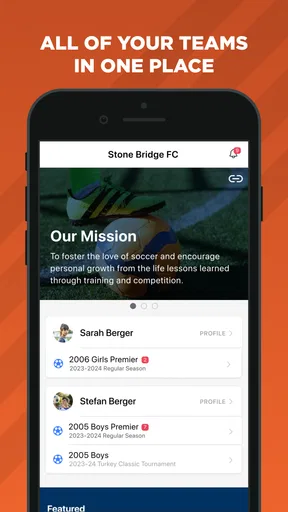
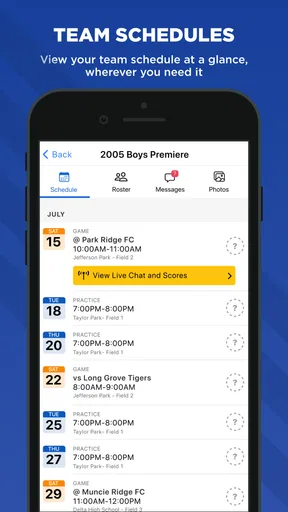
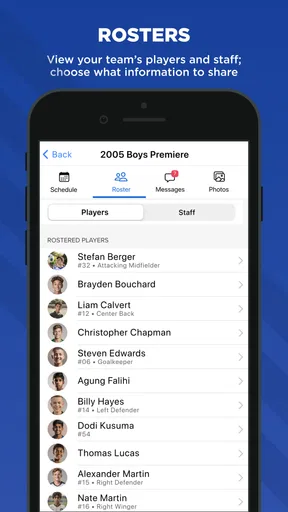
- Streamlines team schedules, rosters, and communication in one place.
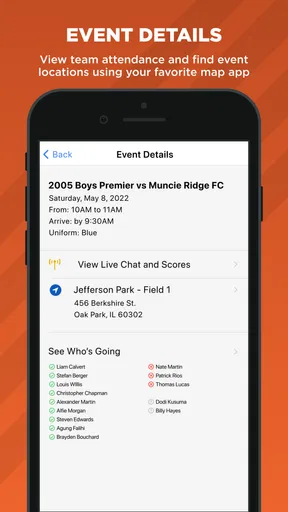
- Parents can quickly access game times, locations, and team updates.
- Useful registration tools simplify sign-ups and payment collection.
- Supports multiple teams and sports under a single organization account.
- Centralized information reduces reliance on scattered messages and emails.
Limitations of Sprocket Sports
- Some features may depend on whether the club has configured them.
- The interface can feel crowded when managing several teams at once.
- Notifications may become excessive during busy seasons.
- Limited value for users whose organization does not use Sprocket Sports.
- Registration and payment options may vary between different clubs.
Similar Picks in This Category
View All
BeSoccer: Soccer Live Score
BeSoccer apps4.3

Cricbuzz - Live Cricket Scores
Cricbuzz.com3.7

NFL
NFL Enterprises LLC2.4

Da Fit
MO YOUNG LIMITED3.6

ESPN
Disney4.5

LiveScore: Live Sports Scores
LiveScore Limited4.5
Frequently Asked Questions
What is Sprocket Sports, and who is it designed for?
Sprocket Sports is a youth sports management platform designed to help clubs, leagues, teams, coaches, parents, and athletes organize sports activities in one place. Depending on the organization’s setup, users may be able to view schedules, receive announcements, manage registrations, communicate with staff, and access team information. The exact features available can vary because each club or league controls how the platform is configured.
Do I need an invitation or account from my sports organization to use Sprocket Sports?
In most cases, yes. Sprocket Sports is generally connected to a participating club, league, or sports organization, so users typically need an account, registration, or invitation before they can access team-specific information. After downloading the app, you may be asked to sign in with existing credentials or follow an invitation link. If you cannot log in, contact your organization rather than creating multiple accounts.
What can parents and athletes do with the Sprocket Sports app?
The available tools depend on the organization, but parents and athletes can commonly use Sprocket Sports to review practice and game schedules, check locations, receive important notifications, view roster details, and stay updated with club announcements. Some organizations may also enable registration, payments, forms, or messaging. Before relying on the app for a particular task, check whether your club has activated that feature.
Does Sprocket Sports support team communication and notifications?
Sprocket Sports can provide communication features that help organizations share updates with families, players, coaches, and staff. Users may receive announcements or schedule changes through the app, depending on their notification settings and the organization’s configuration. It is worth enabling push notifications and checking the app regularly, especially during tournaments or weather-related changes. The app should complement, not replace, any emergency communication method used by your club.
Is Sprocket Sports free to download, and are there any additional costs?
The app itself may be available to download without a separate purchase, but using Sprocket Sports does not necessarily mean that all sports-related services are free. Registration fees, memberships, uniforms, tournament costs, lessons, or other charges are usually determined by the participating club or league. Review the organization’s registration information and payment policies carefully, since pricing and available services can differ between programs.
